STARFALL SALVAGE IS AVAILABLE NOWVersion 1.2 · Play in your browser or download for Game Boy Color
STARFALL / SALVAGE

An original Game Boy Color adventure

STARFALL
SALVAGE.

Bring the station home.

A damaged station. A pulse rig. Just enough momentum to get into trouble. Drift through the wreckage, restore its systems, and get your crew out alive.

Arrows move · Z confirms / pulses · X brakes · Enter pauses.
Click the game to focus it. Use your browser’s Back button to return.

FLIGHT RECORDER / 01● ● ●
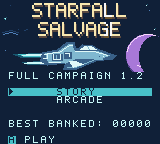
Starfall Salvage 1.2 title screen, with a salvage ship and violet crescent beneath the gold logo, above Story and Arcade choices.
Actual version 1.2 capture160 × 144 / Native emulator

18Story missions

06Station zones

72Scrolling rooms

02Ways to fly

01 / THE JOB

Learn the drift.
Make the return trip.

STORY CAMPAIGN

One station.
18 reasons to go back.

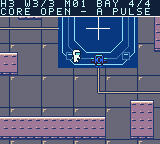
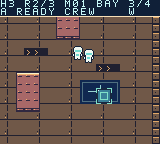
Recover salvage, reactivate ordered relays, repair damaged systems, and escort the crew through 6 zones. Each four-room mission ends with a guardian: evade its dash, wait for CORE OPEN, then land your pulse.

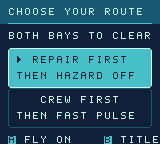
Choose which middle bay comes first, then fly directly from the selected card. Completing power first disables the other middle bay’s hazard; supply first speeds up pulses there. Both bays are required. Next-bay cards show the upcoming objective, and Pause repeats the current one.

4 pulse rigs · Mission checkpoints · Pause and retry
ARCADE SORTIES

One more sector.
Or one safe payday.

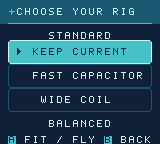
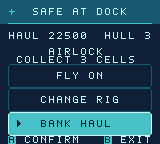
Take on a repeating route of 12 compact maps, with pressure building on later loops. At the dock, Fly On starts the next sector with your current rig. Choose Change Rig when you want an optional replacement, or Bank Haul to secure the score and head home.

Your hull carries between sectors. Lose it all and the unbanked haul goes with it. A smaller score brought home still beats a fortune left in space.

One-press Fly On · Optional rig choices · Best banked score

03 / YOUR FIRST FLIGHT

Small inputs.
Deliberate moves.

  1. Choose Story, then a job.

    Up/Down selects. A confirms. On the flight deck, Left/Right chooses an unlocked rig. Read the objective, then A launches directly. Release and press A again when you want to pulse.

  2. Thrust, drift, brake.

    Tap the D-pad to build momentum. Release it to drift. Hold B to slow down before a turn or to interact beside a station.

  3. Finish the objective. Find the dock.

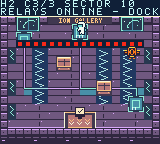
    Complete the task shown on the launch or dock card; press Start to reread it in Pause. Then return beside the actual dock terminal. Delivery is automatic. The bottom edge of a large room is not all safe dock.

Flight controls

Handheld controls and the separate browser edition’s default keys
HandheldBrowserAction
D-padArrowsThrust / choose
AZPulse / confirm
BXBrake, interact / back
StartEnterPause / resume
SelectP or ShiftExit options in play

Watch A READY / A WAIT. Press A for a pulse; holding it does not fire repeatedly. In choice menus, use Up/Down and confirm with A.

All objectives, rigs, and save rules in the manual ↗

04 / PICK YOUR SETUP

Built for Game Boy Color.
Know what is verified.

The native download is Starfall-Salvage-1.2.gbc. It requires color-capable GB/GBC hardware or emulation. It does not run on the original monochrome Game Boy or Game Boy Pocket, and it is not a .gba file.

Compatibility and verification for the version 1.2 native and browser builds
SetupHow to playCurrent evidence
GBC emulatorOpen the .gbc ROM with color emulation and battery-save support. Follow your emulator’s key mapping and save settings. SameBoy is one possible option.Native Story and Arcade passedThe exact 1.2 ROM cleared all 72 Story rooms (31:26, Rank B) and 12 Arcade sectors, banking 22,500. Same-session Continue retained the Story ending. SameBoy remains an installation example, not a tested setup for this release.
SD flash cartridgeUse a compatible GB/GBC SD flash cartridge in a Chromatic or Game Boy Color; follow the card-copy steps below.Confirmed on Chromatic · 1.2The owner confirmed successful 1.2 play on a Chromatic using an SD flash cartridge. Other setups and power-off save persistence remain separate checks.
Writable cartridgeUse a matching cartridge and writer with support for this image. Confirm MBC5, at least 1 MiB ROM, and 32 KiB persistent save RAM.Advanced / untestedHeader: 0x1E, MBC5 + rumble + RAM + battery. This does not establish a tested rumble feature or universal cartridge compatibility.
Browser editionPlay in Browser opens the game directly from this site. Click the game area for keyboard focus. Progress stays in this browser at this site address and does not sync across devices. The native player ZIP remains a separate download.Targeted browser checks passedEight Story rooms and one Arcade sector passed in the tested 1.2 build. Banking 300 and earned Story progress survived ordinary reload. This is bounded coverage, not a full browser campaign or Arcade-cycle test.
Copy the ROM to a compatible SD cartridge
  1. Power off the handheld. Remove the cartridge’s SD card and connect it to your computer with a card reader.
  2. Extract the player ZIP. Copy Starfall-Salvage-1.2.gbc into a games folder on the card, outside the cartridge’s system folder.
  3. Eject the card, reinsert it, power on, and choose the game through the cartridge’s normal menu.
  4. Follow the cartridge manufacturer’s save procedure. Keep existing system files and saves.

No custom Chromatic firmware is required for this route. Chromatic USB is not an SD-card passthrough.

Keep your progress: checkpoints, saves, and Arcade

Story saves at checkpoints—not your exact position in the middle of a room. Choose Continue at the title to restore the committed stage. Retained room-entry briefings show CHECKPOINT SAVED. SAVE WRITE FAILED means you should not assume the write succeeded.

Arcade saves the best banked score; an unfinished sortie has no persistent resume point. Before upgrading, back up the existing ROM and battery save. Use your emulator or cartridge’s normal import/export or association process to connect a copy with Starfall-Salvage-1.2.gbc. Some setups match saves by ROM basename; a new filename does not automatically migrate progress. Keep the backup until Continue and a new save/reopen check succeed.

Browser saves stay in this browser at this site address, do not sync across devices, and are removed when browser storage is cleared. Allow the browser to finish saving before leaving. In the tested 1.2 browser setup, ordinary reload retained the 300-point banked best and Continue restored M03 Bay 1 with full hull. Earned route/mission checkpoints and 1.1-to-1.2 continuation were also checked. Native cold-start saves and full browser-process shutdown remain unverified; check persistence on your chosen setup.

What has been tested—and what remains

The exact native 1.2 ROM completed all 18 missions and 72 Story rooms, with 18 guardians, seven rescues and 31:26, Rank B. One M17 escort failure recovered through ordinary Retry. All 12 native Arcade sectors passed without retry, banking 22,500; same-session Continue restored the Story ending afterward. The fourteen-page illustrated manual and exact-ROM screenshots were reviewed. Targeted browser checks completed M01 and M02, all eight rooms, plus Arcade sector 1 after retry. Change Rig then Back kept the rig unchanged; Bank Haul saved 300 and ordinary reload retained both the best score and Story continuation. Direct launch and Pause/Retry were also exercised. No full browser campaign, complete Arcade cycle or browser clear time is claimed.

CLEAR TIME counts successful room attempts and excludes menus, pauses and failed attempts. First-time human completion time has not been measured. The owner confirmed 1.2 play on a Chromatic with an SD flash cartridge. Independent hardware validation, other setups, actual speaker/headphone listening, native cold-start and power-off-save checks remain separate. The title theme and animation are implemented; heard-audio review remains separate.

05 / READY TO FLY

Your next
salvage run.

Version 1.2 brings filled menu selections, direct Fly On choices, optional rig changes and objective help in Pause. Ship, stars and exhaust animate with the title theme with no intro to wait through. Drift physics and objective rules stay the same.

Download player ZIP

4.35 MB · Native ROM · Illustrated PDF · Quick start · Release notes · Credits

Actual 1.2 native emulator capture · Escape closes this view